diff options
Diffstat (limited to '46.md')
| -rw-r--r-- | 46.md | 230 |
1 files changed, 115 insertions, 115 deletions
| @@ -1,4 +1,12 @@ | |||
| 1 | # NIP-46 - Nostr Remote Signing | 1 | NIP-46 |
| 2 | ====== | ||
| 3 | |||
| 4 | Nostr Remote Signing | ||
| 5 | -------------------- | ||
| 6 | |||
| 7 | ## Changes | ||
| 8 | |||
| 9 | `remote-signer-key` is introduced, passed in bunker url, clients must differentiate between `remote-signer-pubkey` and `user-pubkey`, must call `get_public_key` after connect, nip05 login is removed, create_account moved to another NIP. | ||
| 2 | 10 | ||
| 3 | ## Rationale | 11 | ## Rationale |
| 4 | 12 | ||
| @@ -8,102 +16,70 @@ This NIP describes a method for 2-way communication between a remote signer and | |||
| 8 | 16 | ||
| 9 | ## Terminology | 17 | ## Terminology |
| 10 | 18 | ||
| 11 | - **Local keypair**: A local public and private key-pair used to encrypt content and communicate with the remote signer. Usually created by the client application. | 19 | - **user**: A person that is trying to use Nostr. |
| 12 | - **Remote user pubkey**: The public key that the user wants to sign as. The remote signer has control of the private key that matches this public key. | 20 | - **client**: A user-facing application that _user_ is looking at and clicking buttons in. This application will send requests to _remote-signer_. |
| 13 | - **Remote signer pubkey**: This is the public key of the remote signer itself. This is needed in both `create_account` command because you don't yet have a remote user pubkey. | 21 | - **remote-signer**: A daemon or server running somewhere that will answer requests from _client_, also known as "bunker". |
| 22 | - **client-keypair/pubkey**: The keys generated by _client_. Used to encrypt content and communicate with _remote-signer_. | ||
| 23 | - **remote-signer-keypair/pubkey**: The keys used by _remote-signer_ to encrypt content and communicate with _client_. This keypair MAY be same as _user-keypair_, but not necessarily. | ||
| 24 | - **user-keypair/pubkey**: The actual keys representing _user_ (that will be used to sign events in response to `sign_event` requests, for example). The _remote-signer_ generally has control over these keys. | ||
| 14 | 25 | ||
| 15 | All pubkeys specified in this NIP are in hex format. | 26 | All pubkeys specified in this NIP are in hex format. |
| 16 | 27 | ||
| 17 | ## Initiating a connection | 28 | ## Overview |
| 18 | |||
| 19 | To initiate a connection between a client and a remote signer there are a few different options. | ||
| 20 | |||
| 21 | ### Direct connection initiated by remote signer | ||
| 22 | 29 | ||
| 23 | This is most common in a situation where you have your own nsecbunker or other type of remote signer and want to connect through a client that supports remote signing. | 30 | 1. _client_ generates `client-keypair`. This keypair doesn't need to be communicated to _user_ since it's largely disposable. _client_ might choose to store it locally and they should delete it on logout; |
| 31 | 2. A connection is established (see below), _remote-signer_ learns `client-pubkey`, _client_ learns `remote-signer-pubkey`. | ||
| 32 | 3. _client_ uses `client-keypair` to send requests to _remote-signer_ by `p`-tagging and encrypting to `remote-signer-pubkey`; | ||
| 33 | 4. _remote-signer_ responds to _client_ by `p`-tagging and encrypting to the `client-pubkey`. | ||
| 34 | 5. _client_ requests `get_public_key` to learn `user-pubkey`. | ||
| 24 | 35 | ||
| 25 | The remote signer would provide a connection token in the form: | 36 | ## Initiating a connection |
| 26 | |||
| 27 | ``` | ||
| 28 | bunker://<remote-user-pubkey>?relay=<wss://relay-to-connect-on>&relay=<wss://another-relay-to-connect-on>&secret=<optional-secret-value> | ||
| 29 | ``` | ||
| 30 | 37 | ||
| 31 | This token is pasted into the client by the user and the client then uses the details to connect to the remote signer via the specified relay(s). | 38 | There are two ways to initiate a connection: |
| 32 | 39 | ||
| 33 | ### Direct connection initiated by the client | 40 | ### Direct connection initiated by _remote-signer_ |
| 34 | 41 | ||
| 35 | In this case, basically the opposite direction of the first case, the client provides a connection token (or encodes the token in a QR code) and the signer initiates a connection to the client via the specified relay(s). | 42 | _remote-signer_ provides connection token in the form: |
| 36 | 43 | ||
| 37 | ``` | 44 | ``` |
| 38 | nostrconnect://<local-keypair-pubkey>?relay=<wss://relay-to-connect-on>&metadata=<json metadata in the form: {"name":"...", "url": "...", "description": "..."}> | 45 | bunker://<remote-signer-pubkey>?relay=<wss://relay-to-connect-on>&relay=<wss://another-relay-to-connect-on>&secret=<optional-secret-value> |
| 39 | ``` | 46 | ``` |
| 40 | 47 | ||
| 41 | ## The flow | 48 | _user_ passes this token to _client_, which then sends `connect` request to _remote-signer_ via the specified relays. Optional secret can be used for single successfully established connection only, _remote-signer_ SHOULD ignore new attempts to establish connection with old secret. |
| 42 | 49 | ||
| 43 | 1. Client creates a local keypair. This keypair doesn't need to be communicated to the user since it's largely disposable (i.e. the user doesn't need to see this pubkey). Clients might choose to store it locally and they should delete it when the user logs out. | 50 | ### Direct connection initiated by the _client_ |
| 44 | 2. Client gets the remote user pubkey (either via a `bunker://` connection string or a NIP-05 login-flow; shown below) | ||
| 45 | 3. Clients use the local keypair to send requests to the remote signer by `p`-tagging and encrypting to the remote user pubkey. | ||
| 46 | 4. The remote signer responds to the client by `p`-tagging and encrypting to the local keypair pubkey. | ||
| 47 | 51 | ||
| 48 | ### Example flow for signing an event | 52 | _client_ provides a connection token using `nostrconnect://` as the protocol, and `client-pubkey` as the origin. Additional information should be passed as query parameters: |
| 49 | 53 | ||
| 50 | - Remote user pubkey (e.g. signing as) `fa984bd7dbb282f07e16e7ae87b26a2a7b9b90b7246a44771f0cf5ae58018f52` | 54 | - `relay` (required) - one or more relay urls on which the _client_ is listening for responses from the _remote-signer_. |
| 51 | - Local pubkey is `eff37350d839ce3707332348af4549a96051bd695d3223af4aabce4993531d86` | 55 | - `secret` (required) - a short random string that the _remote-signer_ should return as the `result` field of its response. |
| 56 | - `perms` (optional) - a comma-separated list of permissions the _client_ is requesting be approved by the _remote-signer_ | ||
| 57 | - `name` (optional) - the name of the _client_ application | ||
| 58 | - `url` (optional) - the canonical url of the _client_ application | ||
| 59 | - `image` (optional) - a small image representing the _client_ application | ||
| 52 | 60 | ||
| 53 | #### Signature request | 61 | Here's an example: |
| 54 | 62 | ||
| 55 | ```json | ||
| 56 | { | ||
| 57 | "kind": 24133, | ||
| 58 | "pubkey": "eff37350d839ce3707332348af4549a96051bd695d3223af4aabce4993531d86", | ||
| 59 | "content": nip04({ | ||
| 60 | "id": <random_string>, | ||
| 61 | "method": "sign_event", | ||
| 62 | "params": [json_stringified(<{ | ||
| 63 | content: "Hello, I'm signing remotely", | ||
| 64 | kind: 1, | ||
| 65 | tags: [], | ||
| 66 | created_at: 1714078911 | ||
| 67 | }>)] | ||
| 68 | }), | ||
| 69 | "tags": [["p", "fa984bd7dbb282f07e16e7ae87b26a2a7b9b90b7246a44771f0cf5ae58018f52"]], // p-tags the remote user pubkey | ||
| 70 | } | ||
| 71 | ``` | 63 | ``` |
| 72 | 64 | nostrconnect://83f3b2ae6aa368e8275397b9c26cf550101d63ebaab900d19dd4a4429f5ad8f5?relay=wss%3A%2F%2Frelay1.example.com&perms=nip44_encrypt%2Cnip44_decrypt%2Csign_event%3A13%2Csign_event%3A14%2Csign_event%3A1059&name=My+Client&secret=0s8j2djs&relay=wss%3A%2F%2Frelay2.example2.com | |
| 73 | #### Response event | ||
| 74 | |||
| 75 | ```json | ||
| 76 | { | ||
| 77 | "kind": 24133, | ||
| 78 | "pubkey": "fa984bd7dbb282f07e16e7ae87b26a2a7b9b90b7246a44771f0cf5ae58018f52", | ||
| 79 | "content": nip04({ | ||
| 80 | "id": <random_string>, | ||
| 81 | "result": json_stringified(<signed-event>) | ||
| 82 | }), | ||
| 83 | "tags": [["p", "eff37350d839ce3707332348af4549a96051bd695d3223af4aabce4993531d86"]], // p-tags the local keypair pubkey | ||
| 84 | } | ||
| 85 | ``` | 65 | ``` |
| 86 | 66 | ||
| 87 | #### Diagram | 67 | _user_ passes this token to _remote-signer_, which then sends `connect` *response* event to the `client-pubkey` via the specified relays. Client discovers `remote-signer-pubkey` from connect response author. `secret` value MUST be provided to avoid connection spoofing, _client_ MUST validate the `secret` returned by `connect` response. |
| 88 | |||
| 89 |  | ||
| 90 | 68 | ||
| 91 | ## Request Events `kind: 24133` | 69 | ## Request Events `kind: 24133` |
| 92 | 70 | ||
| 93 | ```json | 71 | ```jsonc |
| 94 | { | 72 | { |
| 95 | "id": <id>, | ||
| 96 | "kind": 24133, | 73 | "kind": 24133, |
| 97 | "pubkey": <local_keypair_pubkey>, | 74 | "pubkey": <local_keypair_pubkey>, |
| 98 | "content": <nip04(<request>)>, | 75 | "content": <nip44(<request>)>, |
| 99 | "tags": [["p", <remote_user_pubkey>]], // NB: in the `create_account` event, the remote signer pubkey should be `p` tagged. | 76 | "tags": [["p", <remote-signer-pubkey>]], |
| 100 | "created_at": <unix timestamp in seconds> | ||
| 101 | } | 77 | } |
| 102 | ``` | 78 | ``` |
| 103 | 79 | ||
| 104 | The `content` field is a JSON-RPC-like message that is [NIP-04](https://github.com/nostr-protocol/nips/blob/master/04.md) encrypted and has the following structure: | 80 | The `content` field is a JSON-RPC-like message that is [NIP-44](44.md) encrypted and has the following structure: |
| 105 | 81 | ||
| 106 | ```json | 82 | ```jsonc |
| 107 | { | 83 | { |
| 108 | "id": <random_string>, | 84 | "id": <random_string>, |
| 109 | "method": <method_name>, | 85 | "method": <method_name>, |
| @@ -117,15 +93,15 @@ The `content` field is a JSON-RPC-like message that is [NIP-04](https://github.c | |||
| 117 | 93 | ||
| 118 | ### Methods/Commands | 94 | ### Methods/Commands |
| 119 | 95 | ||
| 120 | Each of the following are methods that the client sends to the remote signer. | 96 | Each of the following are methods that the _client_ sends to the _remote-signer_. |
| 121 | 97 | ||
| 122 | | Command | Params | Result | | 98 | | Command | Params | Result | |
| 123 | | ------------------------ | ------------------------------------------------- | ---------------------------------------------------------------------- | | 99 | | ------------------------ | ------------------------------------------------- | ---------------------------------------------------------------------- | |
| 124 | | `connect` | `[<remote_user_pubkey>, <optional_secret>, <optional_requested_permissions>]` | "ack" | | 100 | | `connect` | `[<remote-signer-pubkey>, <optional_secret>, <optional_requested_permissions>]` | "ack" OR `<required-secret-value>` | |
| 125 | | `sign_event` | `[<{kind, content, tags, created_at}>]` | `json_stringified(<signed_event>)` | | 101 | | `sign_event` | `[<{kind, content, tags, created_at}>]` | `json_stringified(<signed_event>)` | |
| 126 | | `ping` | `[]` | "pong" | | 102 | | `ping` | `[]` | "pong" | |
| 127 | | `get_relays` | `[]` | `json_stringified({<relay_url>: {read: <boolean>, write: <boolean>}})` | | 103 | | `get_relays` | `[]` | `json_stringified({<relay_url>: {read: <boolean>, write: <boolean>}})` | |
| 128 | | `get_public_key` | `[]` | `<hex-pubkey>` | | 104 | | `get_public_key` | `[]` | `<user-pubkey>` | |
| 129 | | `nip04_encrypt` | `[<third_party_pubkey>, <plaintext_to_encrypt>]` | `<nip04_ciphertext>` | | 105 | | `nip04_encrypt` | `[<third_party_pubkey>, <plaintext_to_encrypt>]` | `<nip04_ciphertext>` | |
| 130 | | `nip04_decrypt` | `[<third_party_pubkey>, <nip04_ciphertext_to_decrypt>]` | `<plaintext>` | | 106 | | `nip04_decrypt` | `[<third_party_pubkey>, <nip04_ciphertext_to_decrypt>]` | `<plaintext>` | |
| 131 | | `nip44_encrypt` | `[<third_party_pubkey>, <plaintext_to_encrypt>]` | `<nip44_ciphertext>` | | 107 | | `nip44_encrypt` | `[<third_party_pubkey>, <plaintext_to_encrypt>]` | `<nip44_ciphertext>` | |
| @@ -133,7 +109,7 @@ Each of the following are methods that the client sends to the remote signer. | |||
| 133 | 109 | ||
| 134 | ### Requested permissions | 110 | ### Requested permissions |
| 135 | 111 | ||
| 136 | The `connect` method may be provided with `optional_requested_permissions` for user convenience. The permissions are a comma-separated list of `method[:params]`, i.e. `nip04_encrypt,sign_event:4` meaning permissions to call `nip04_encrypt` and to call `sign_event` with `kind:4`. Optional parameter for `sign_event` is the kind number, parameters for other methods are to be defined later. | 112 | The `connect` method may be provided with `optional_requested_permissions` for user convenience. The permissions are a comma-separated list of `method[:params]`, i.e. `nip44_encrypt,sign_event:4` meaning permissions to call `nip44_encrypt` and to call `sign_event` with `kind:4`. Optional parameter for `sign_event` is the kind number, parameters for other methods are to be defined later. Same permission format may be used for `perms` field of `metadata` in `nostrconnect://` string. |
| 137 | 113 | ||
| 138 | ## Response Events `kind:24133` | 114 | ## Response Events `kind:24133` |
| 139 | 115 | ||
| @@ -141,14 +117,14 @@ The `connect` method may be provided with `optional_requested_permissions` for u | |||
| 141 | { | 117 | { |
| 142 | "id": <id>, | 118 | "id": <id>, |
| 143 | "kind": 24133, | 119 | "kind": 24133, |
| 144 | "pubkey": <remote_signer_pubkey>, | 120 | "pubkey": <remote-signer-pubkey>, |
| 145 | "content": <nip04(<response>)>, | 121 | "content": <nip44(<response>)>, |
| 146 | "tags": [["p", <local_keypair_pubkey>]], | 122 | "tags": [["p", <client-pubkey>]], |
| 147 | "created_at": <unix timestamp in seconds> | 123 | "created_at": <unix timestamp in seconds> |
| 148 | } | 124 | } |
| 149 | ``` | 125 | ``` |
| 150 | 126 | ||
| 151 | The `content` field is a JSON-RPC-like message that is [NIP-04](https://github.com/nostr-protocol/nips/blob/master/04.md) encrypted and has the following structure: | 127 | The `content` field is a JSON-RPC-like message that is [NIP-44](44.md) encrypted and has the following structure: |
| 152 | 128 | ||
| 153 | ```json | 129 | ```json |
| 154 | { | 130 | { |
| @@ -162,66 +138,90 @@ The `content` field is a JSON-RPC-like message that is [NIP-04](https://github.c | |||
| 162 | - `results` is a string of the result of the call (this can be either a string or a JSON stringified object) | 138 | - `results` is a string of the result of the call (this can be either a string or a JSON stringified object) |
| 163 | - `error`, _optionally_, it is an error in string form, if any. Its presence indicates an error with the request. | 139 | - `error`, _optionally_, it is an error in string form, if any. Its presence indicates an error with the request. |
| 164 | 140 | ||
| 165 | ### Auth Challenges | 141 | ## Example flow for signing an event |
| 166 | 142 | ||
| 167 | An Auth Challenge is a response that a remote signer can send back when it needs the user to authenticate via other means. This is currently used in the OAuth-like flow enabled by signers like [Nsecbunker](https://github.com/kind-0/nsecbunkerd/). The response `content` object will take the following form: | 143 | - `remote-signer-pubkey` is `fa984bd7dbb282f07e16e7ae87b26a2a7b9b90b7246a44771f0cf5ae58018f52` |
| 144 | - `user-pubkey` is also `fa984bd7dbb282f07e16e7ae87b26a2a7b9b90b7246a44771f0cf5ae58018f52` | ||
| 145 | - `client-pubkey` is `eff37350d839ce3707332348af4549a96051bd695d3223af4aabce4993531d86` | ||
| 168 | 146 | ||
| 169 | ```json | 147 | ### Signature request |
| 148 | |||
| 149 | ```jsonc | ||
| 170 | { | 150 | { |
| 171 | "id": <request_id>, | 151 | "kind": 24133, |
| 172 | "result": "auth_url", | 152 | "pubkey": "eff37350d839ce3707332348af4549a96051bd695d3223af4aabce4993531d86", |
| 173 | "error": <URL_to_display_to_end_user> | 153 | "content": nip44({ |
| 154 | "id": <random_string>, | ||
| 155 | "method": "sign_event", | ||
| 156 | "params": [json_stringified(<{ | ||
| 157 | content: "Hello, I'm signing remotely", | ||
| 158 | kind: 1, | ||
| 159 | tags: [], | ||
| 160 | created_at: 1714078911 | ||
| 161 | }>)] | ||
| 162 | }), | ||
| 163 | "tags": [["p", "fa984bd7dbb282f07e16e7ae87b26a2a7b9b90b7246a44771f0cf5ae58018f52"]], // p-tags the remote-signer-pubkey | ||
| 174 | } | 164 | } |
| 175 | ``` | 165 | ``` |
| 176 | 166 | ||
| 177 | Clients should display (in a popup or new tab) the URL from the `error` field and then subscribe/listen for another response from the remote signer (reusing the same request ID). This event will be sent once the user authenticates in the other window (or will never arrive if the user doesn't authenticate). It's also possible to add a `redirect_uri` url parameter to the auth_url, which is helpful in situations when a client cannot open a new window or tab to display the auth challenge. | 167 | ### Response event |
| 178 | |||
| 179 | #### Example event signing request with auth challenge | ||
| 180 | |||
| 181 | 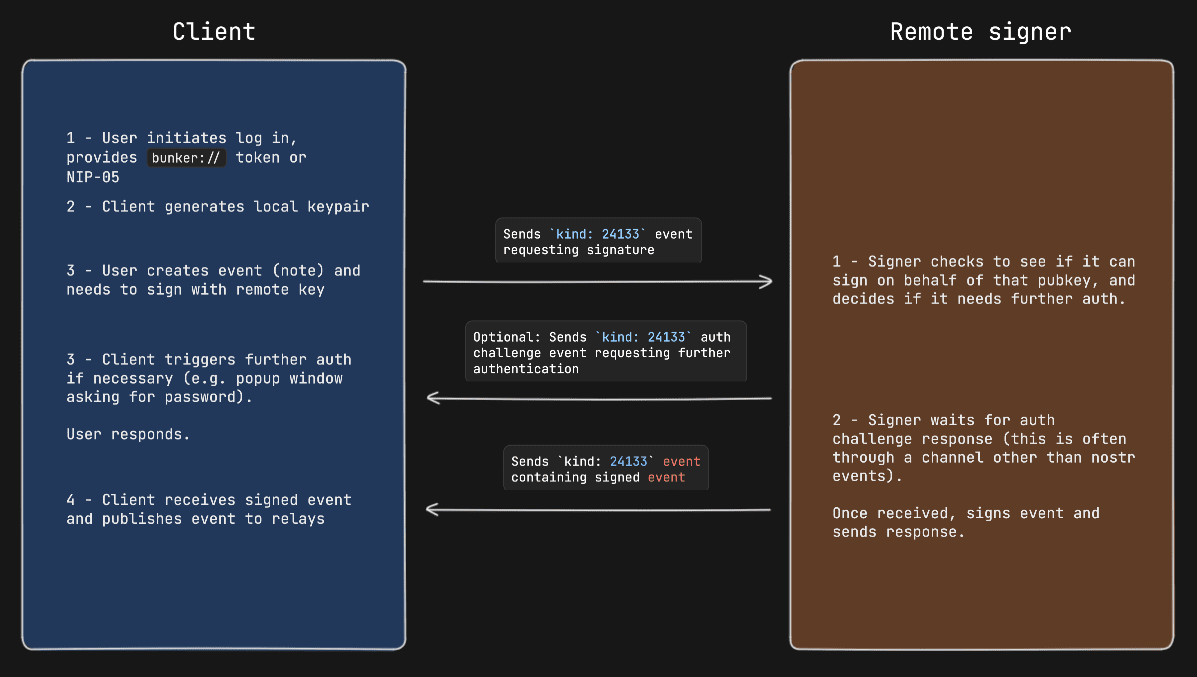 | ||
| 182 | |||
| 183 | ## Remote Signer Commands | ||
| 184 | 168 | ||
| 185 | Remote signers might support additional commands when communicating directly with it. These commands follow the same flow as noted above, the only difference is that when the client sends a request event, the `p`-tag is the pubkey of the remote signer itself and the `content` payload is encrypted to the same remote signer pubkey. | 169 | ```jsonc |
| 186 | 170 | { | |
| 187 | ### Methods/Commands | 171 | "kind": 24133, |
| 188 | 172 | "pubkey": "fa984bd7dbb282f07e16e7ae87b26a2a7b9b90b7246a44771f0cf5ae58018f52", | |
| 189 | Each of the following are methods that the client sends to the remote signer. | 173 | "content": nip44({ |
| 190 | 174 | "id": <random_string>, | |
| 191 | | Command | Params | Result | | 175 | "result": json_stringified(<signed-event>) |
| 192 | | ---------------- | ------------------------------------------ | ------------------------------------ | | 176 | }), |
| 193 | | `create_account` | `[<username>, <domain>, <optional_email>, <optional_requested_permissions>]` | `<newly_created_remote_user_pubkey>` | | 177 | "tags": [["p", "eff37350d839ce3707332348af4549a96051bd695d3223af4aabce4993531d86"]], // p-tags the client-pubkey |
| 178 | } | ||
| 179 | ``` | ||
| 194 | 180 | ||
| 195 | ## Appendix | 181 | ### Diagram |
| 196 | 182 | ||
| 197 | ### NIP-05 Login Flow | 183 |  |
| 198 | 184 | ||
| 199 | Clients might choose to present a more familiar login flow, so users can type a NIP-05 address instead of a `bunker://` string. | ||
| 200 | 185 | ||
| 201 | When the user types a NIP-05 the client: | 186 | ## Auth Challenges |
| 202 | 187 | ||
| 203 | - Queries the `/.well-known/nostr.json` file from the domain for the NIP-05 address provided to get the user's pubkey (this is the **remote user pubkey**) | 188 | An Auth Challenge is a response that a _remote-signer_ can send back when it needs the _user_ to authenticate via other means. The response `content` object will take the following form: |
| 204 | - In the same `/.well-known/nostr.json` file, queries for the `nip46` key to get the relays that the remote signer will be listening on. | ||
| 205 | - Now the client has enough information to send commands to the remote signer on behalf of the user. | ||
| 206 | 189 | ||
| 207 | ### OAuth-like Flow | 190 | ```json |
| 191 | { | ||
| 192 | "id": <request_id>, | ||
| 193 | "result": "auth_url", | ||
| 194 | "error": <URL_to_display_to_end_user> | ||
| 195 | } | ||
| 196 | ``` | ||
| 208 | 197 | ||
| 209 | #### Remote signer discovery via NIP-89 | 198 | _client_ should display (in a popup or new tab) the URL from the `error` field and then subscribe/listen for another response from the _remote-signer_ (reusing the same request ID). This event will be sent once the user authenticates in the other window (or will never arrive if the user doesn't authenticate). |
| 210 | 199 | ||
| 211 | In this last case, most often used to facilitate an OAuth-like signin flow, the client first looks for remote signers that have announced themselves via NIP-89 application handler events. | 200 | ### Example event signing request with auth challenge |
| 212 | 201 | ||
| 213 | First the client will query for `kind: 31990` events that have a `k` tag of `24133`. | 202 |  |
| 214 | 203 | ||
| 215 | These are generally shown to a user, and once the user selects which remote signer to use and provides the remote user pubkey they want to use (via npub, pubkey, or nip-05 value), the client can initiate a connection. Note that it's on the user to select the remote signer that is actually managing the remote key that they would like to use in this case. If the remote user pubkey is managed on another remote signer, the connection will fail. | 204 | ## Appendix |
| 216 | 205 | ||
| 217 | In addition, it's important that clients validate that the pubkey of the announced remote signer matches the pubkey of the `_` entry in the `/.well-known/nostr.json` file of the remote signer's announced domain. | 206 | ### Announcing _remote-signer_ metadata |
| 218 | 207 | ||
| 219 | Clients that allow users to create new accounts should also consider validating the availability of a given username in the namespace of remote signer's domain by checking the `/.well-known/nostr.json` file for existing usernames. Clients can then show users feedback in the UI before sending a `create_account` event to the remote signer and receiving an error in return. Ideally, remote signers would also respond with understandable error messages if a client tries to create an account with an existing username. | 208 | _remote-signer_ MAY publish it's metadata by using [NIP-05](05.md) and [NIP-89](89.md). With NIP-05, a request to `<remote-signer>/.well-known/nostr.json?name=_` MAY return this: |
| 209 | ```jsonc | ||
| 210 | { | ||
| 211 | "names":{ | ||
| 212 | "_": <remote-signer-app-pubkey>, | ||
| 213 | }, | ||
| 214 | "nip46": { | ||
| 215 | "relays": ["wss://relay1","wss://relay2"...], | ||
| 216 | "nostrconnect_url": "https://remote-signer-domain.example/<nostrconnect>" | ||
| 217 | } | ||
| 218 | } | ||
| 219 | ``` | ||
| 220 | 220 | ||
| 221 | #### Example Oauth-like flow to create a new user account with Nsecbunker | 221 | The `<remote-signer-app-pubkey>` MAY be used to verify the domain from _remote-signer_'s NIP-89 event (see below). `relays` SHOULD be used to construct a more precise `nostrconnect://` string for the specific `remote-signer`. `nostrconnect_url` template MAY be used to redirect users to _remote-signer_'s connection flow by replacing `<nostrconnect>` placeholder with an actual `nostrconnect://` string. |
| 222 | 222 | ||
| 223 | Coming soon... | 223 | ### Remote signer discovery via NIP-89 |
| 224 | 224 | ||
| 225 | ## References | 225 | _remote-signer_ MAY publish a NIP-89 `kind: 31990` event with `k` tag of `24133`, which MAY also include one or more `relay` tags and MAY include `nostrconnect_url` tag. The semantics of `relay` and `nostrconnect_url` tags are the same as in the section above. |
| 226 | 226 | ||
| 227 | - [NIP-04 - Encryption](https://github.com/nostr-protocol/nips/blob/master/04.md) | 227 | _client_ MAY improve UX by discovering _remote-signers_ using their `kind: 31990` events. _client_ MAY then pre-generate `nostrconnect://` strings for the _remote-signers_, and SHOULD in that case verify that `kind: 31990` event's author is mentioned in signer's `nostr.json?name=_` file as `<remote-signer-app-pubkey>`. |